


FOX13 Memphis
3.7866.00 Reviews
App Specs
- Version
- Varies with Device
- Updated On
- License
- Free
- Downloads
- 100,000+
- Developer
- Standard Media Group
- Categories
- News & Magazines
- Platform
- Android
Screenshots

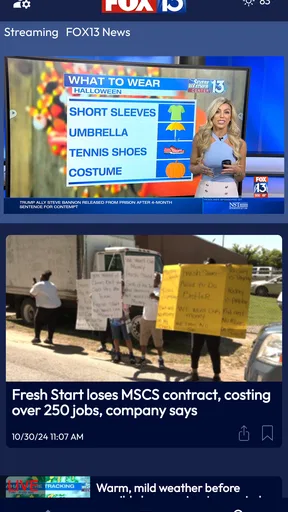
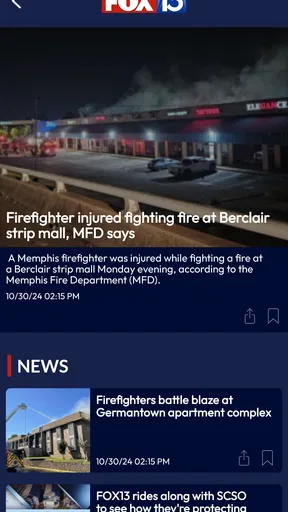

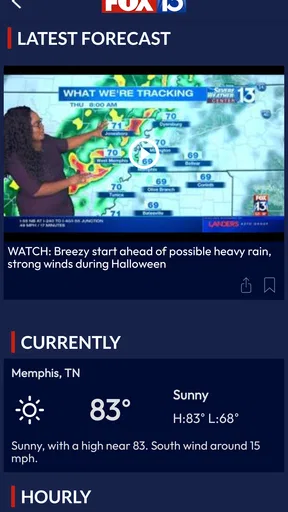
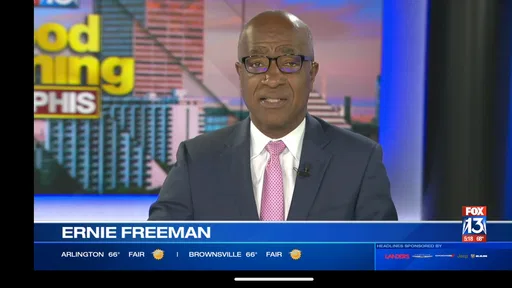
 Analysis by AppCompare
When I want a quick look at what is happening around Memphis, I prefer a focused local news app over a broad national feed. FOX13 Memphis is built for that purpose: it brings together local reporting, traffic information, weather coverage, and live video in one place. I found the experience most useful when I needed a fast update rather than a long reading session, especially while moving between home, work, and the road.
This is a free News & Magazines app from Standard Media Group, rated for Everyone. It has been available since July 2, 2010, and its audience has grown to over 100 thousand installs. The current average is 3.7 from around 3.2 thousand ratings, with roughly 866 written reviews. Those figures suggest a familiar local-news product with a substantial audience, though not one that will satisfy every reader equally.
My overall impression is that FOX13 Memphis works best as a practical local information tool. It is not trying to replace every national news source, a dedicated weather service, or a full traffic-navigation system. Instead, its value comes from putting Memphis-area updates and live coverage close at hand. The quality of the experience depends heavily on your connection, your location, and whether the newsroom is covering the kind of event you care about at that moment.
How FOX13 Memphis feels when the network is doing the work
The app’s main strength becomes clear when information is changing quickly. A local news story can develop while I am away from a television, and having news, traffic, weather, and live video together makes it easier to check the situation without jumping between several unrelated apps. That combination is more useful than a simple article feed when the question is not just “what happened?” but “what does this mean for my next hour?”
Connectivity is central to that experience. Articles, fresh updates, and especially live video depend on the app reaching its online sources. With a stable connection, the app feels like a compact local newsroom: open it, scan the latest items, and choose whether to read or watch. When the network is weak, the difference is noticeable because the most valuable parts of the app are also the parts that need timely delivery.
I would not treat it as a guaranteed substitute for having information saved on the phone. Its purpose is current coverage, so the practical assumption is that you should open it when you can connect. That matters during travel, in large buildings, or in areas where mobile service changes from one block to the next. If you need a resource that remains dependable when your signal disappears, this is not the right tool to rely on by itself.
Live video is useful, but it is the most connection-sensitive part
Live video gives the app a different feel from a traditional text-only local-news reader. Watching coverage can help when a headline is too brief to explain the situation or when the visual context matters. It is also a convenient option for someone who would rather listen and watch than read several short updates.
Worth Reading Before You Choose

EA SPORTS FC Mobile 26 Is a Bigger Football Game, but It Takes Time

Flipboard Shows What News Apps Must Do Beyond the Feed

Switching to Android Auto Means Rethinking Your Driving Routine

Google Calendar Makes a Crowded Week Easier to Manage

Ludo King Makes the Most of the Minutes Between Plans

Baby Panda World Brings Quick Play to Modern Phones, but Its Game Library Feels Busy
The trade-off is that video is less forgiving than text when the connection fluctuates. A weak signal can make starting a stream frustrating, and interruptions are more disruptive than a slowly loading article. I see live video as something to use when I have a reasonably steady connection, not as the only way to follow an urgent story.
A useful habit is to read the headline and available text first, then choose video when it adds something meaningful. That approach avoids wasting time waiting for a stream when a written update already answers the immediate question. It also makes the app more practical on mobile data, where video can be the heaviest part of a quick news check.
Traffic information is most valuable before the drive begins
The traffic section fits naturally into a morning routine. Before leaving, I can check for local developments that might affect the route and then decide whether I need more detailed navigation elsewhere. This is a different job from turn-by-turn navigation: FOX13 Memphis can provide the local news context, while a navigation app is usually better at recalculating a route in real time.
That distinction is important. I would use this app to understand why a commute may be difficult, especially when a crash, road issue, or broader local event is being reported. I would not expect it to replace a navigation service for exact arrival estimates or continuous route guidance. Used together, the two tools make more sense than asking one app to do both jobs.
The connection also affects timing. A traffic update is useful only if it is current enough for the decision I am making. Checking shortly before leaving is more sensible than opening the app much earlier and assuming the same conditions will remain. For drivers, the safest workflow is to review information before moving and avoid handling the phone while driving.
Weather checks need context, not just a glance
Weather coverage is another reason to keep the app installed if Memphis conditions affect your daily plans. A quick look can help me decide whether to change clothing, allow extra travel time, or reconsider an outdoor activity. Local coverage can feel more relevant than a generic forecast because it is presented alongside other area news.
Still, I would not make a major safety decision from one quick glance at a headline. Weather can change quickly, and the useful detail may be inside the full report or video rather than in the first screen. When conditions are serious, I would check the latest available coverage carefully and use other reliable alerts when appropriate.
This is one of the app’s less obvious strengths: the sections work better together than separately. A weather event can affect roads, schools, events, and local reporting at the same time. Seeing those subjects in one local environment gives me more context than checking an isolated forecast tile.
Using it in real mobile situations
I use this section to look at how FOX13 Memphis fits into ordinary routines, from a quick check before leaving home to following a story while away from the television. The key is deciding what answer I need first: local context, a written update, or live coverage. That choice shapes how smoothly I move from the app’s information to whatever I need to do next.
A realistic morning commute
Imagine leaving home for work and hearing that travel around Memphis may be affected by a developing incident. I would open FOX13 Memphis while still parked, scan the traffic-related coverage, and check whether weather or a local report changes the picture. If the story is developing, I might watch the available live coverage for context, then switch to my navigation app to choose the route.
This workflow shows exactly where the app fits. It is the information layer, not necessarily the navigation layer. It helps answer whether the commute deserves attention before I start driving, while another tool can handle directions. The benefit is fewer disconnected searches; the limitation is that I still need a second service for precise routing.
Checking news between errands
For short breaks, the app is easier to justify than a long-form news website. I can open it, scan local headlines, and decide whether anything deserves a deeper read. That makes it suitable for people who want Memphis-specific awareness without spending a large part of the day following national news cycles.
On a weak mobile connection, I would keep the session simple: start with text, avoid opening several video items at once, and give the app time to finish loading before repeatedly tapping around. Repeated reloads rarely improve a poor signal and can make the experience feel less reliable than it really is.
Watching from home on a stronger connection
At home, live video is more attractive because a stable Wi-Fi connection removes some of the friction associated with mobile coverage. I can spend more time with a developing story and use the app as a convenient companion to other local information sources. The larger screen of a tablet may also make video and longer articles more comfortable, although the app remains designed for mobile use.
Even in this setting, I would keep expectations realistic. A local news app is not the same as an always-on television channel or a complete archive of every event. Its usefulness varies with the news cycle. On a quiet day, it may be a quick check; during a major local story, it can become much more valuable.
Traveling outside the Memphis area
The app’s focus is its advantage for Memphis news and its limitation elsewhere. If I am visiting another city, its local traffic and weather context becomes less relevant to my immediate decisions. I might still want to follow events back home, but I would not install it expecting broad regional coverage.
That makes the audience fairly clear. People who live in Memphis, work there, commute through the area, or have family and ongoing interests there are the natural users. Someone looking for a single nationwide news app should choose a broader alternative and perhaps keep this one only if Memphis coverage is personally important.
What happens when the connection fails?
The most frustrating moment is opening the app precisely when an update matters and finding that the network is slow or unavailable. Because the app is centered on current news, traffic, weather, and live video, connection problems affect the core experience rather than an optional extra. I would not plan an emergency information routine around it alone.
My recovery approach would be straightforward. First, I would check whether other apps can reach the internet, which separates an app-specific delay from a wider connectivity problem. Then I would try a stronger connection, reopen the app, and begin with text instead of live video. If the information is urgent, I would use another trusted channel rather than repeatedly waiting for one stream to load.
This is also where the app’s rating feels understandable. A local news product can be genuinely useful when it delivers timely coverage, yet feel disappointing when a user encounters loading delays during an important moment. Some of that frustration comes from network conditions rather than editorial quality, but the user experiences both as one thing.
Keeping mobile data under control
Since the app includes live video, I would be selective when using cellular data. Text-first browsing is the sensible default for a quick update. I would save video for a stable connection or for situations where seeing the coverage adds real value. That is a practical trade-off, especially for people with limited data plans or inconsistent service.
I would also avoid leaving a live report playing after I have received the information I needed. Start the stream intentionally, watch the relevant portion, and close it when finished. This is not only better for data use; it keeps the app from becoming a background drain on attention while I am doing something else.
Another useful habit is to separate urgent checks from casual browsing. For an urgent traffic question, I would look for the newest relevant report and then move on. For relaxed reading, I might explore more stories when connected to Wi-Fi. Treating those as separate sessions makes the app feel more predictable and prevents a short check from turning into an unnecessarily long media session.
How it compares with usual alternatives
Compared with a national news app, FOX13 Memphis offers a narrower but more locally relevant experience. A national service is better for international headlines, national politics, and broad context. This app is better when the question begins with “what is happening around Memphis?” rather than “what is happening everywhere?”
Compared with a dedicated weather app, it offers more surrounding news and video context but may not be the first choice for detailed forecast tools or repeated weather checks. Compared with a navigation app, it can explain a traffic problem through local reporting but is not the tool I would choose for route management. Compared with a social media feed, it provides a more focused path to local coverage and less dependence on whatever happens to appear in an algorithmic timeline.
The best alternative depends on the job. If I want one quick local source that combines several kinds of coverage, I would choose FOX13 Memphis. If I need deep national reporting, precise navigation, detailed forecasting, or a service designed around low-connectivity use, I would add or choose something more specialized.
Who should install it, and who should skip it?
I would recommend it to Memphis residents, commuters, local families, and anyone who wants a convenient way to check area news without opening a browser and searching repeatedly. It is also a reasonable choice for people who like live coverage and want traffic and weather placed near their local headlines.
I would skip it if my main need is national or international news, highly detailed weather analysis, or continuous turn-by-turn driving assistance. I would also be cautious about making it my only source during a connectivity problem or a serious emergency. The app is most effective as one part of a sensible information setup, not as a universal replacement for every other service.
Small habits that make the experience better
Open it before leaving rather than while driving, then use a navigation app for the actual route.
Read the written update before starting live video; the text may be enough for a quick decision.
Use a stronger connection for longer viewing sessions and reserve cellular data for essential checks.
When a page seems stuck, test the wider connection before assuming the news content itself is unavailable.
Use the app for Memphis context and pair it with a broader or more specialized service when your question goes beyond local coverage.
My final view on the connectivity trade-off
FOX13 Memphis succeeds when I treat it as a connected local-news companion. Its mix of Memphis reporting, traffic, weather, and live video gives it more practical range than a basic headline reader, and the free price makes it easy to try. The Everyone rating also makes it suitable for a broad household audience.
Its weakness is tied to the same design choice that makes it useful: current coverage needs a working connection. Text can be the more forgiving option, while live video is more demanding and should be used deliberately. A poor signal can turn an otherwise convenient check into a wait, so I would keep another trusted way to receive important information.
After using it in different mobile contexts, I see the app as a good fit for people who want Memphis news close at hand, especially before a commute or during a developing local story. I would recommend FOX13 Memphis as a focused local source, provided you understand its boundaries. It is strongest when paired with specialized tools for navigation, detailed weather, or broader news, and when you have enough connectivity to let its most useful features work properly.
Pros
- Fast access to breaking news and local Memphis updates.
- Live weather forecasts
- radar
- and severe weather alerts.
- Video reports make major stories easier to follow.
- Covers local traffic
- sports
- and community events.
- Push notifications help users stay informed throughout the day.
Cons
- Some content may require a stable internet connection.
- Frequent notifications can feel excessive for some users.
- Advertising may interrupt browsing and video viewing.
- Coverage is focused mainly on Memphis and nearby areas.
- App performance may vary during major breaking-news events.
FAQs for FOX13 Memphis
What is FOX13 Memphis, and what can I use the app for?
FOX13 Memphis is a local news application focused on Memphis, Tennessee, and the surrounding Mid-South region. After installing it, users can typically browse breaking news, local reports, weather updates, traffic information, sports coverage, entertainment stories, and video content. The app is designed for quick access to regional headlines, although the exact sections and available features may change with future updates.
Does the FOX13 Memphis app provide live news and weather alerts?
The app generally offers breaking-news notifications and weather-related updates, which can be useful during severe storms, tornado warnings, flooding, or other local emergencies. Depending on your location and the current app version, live broadcasts or continuous news streams may also be available. Users should enable notifications and location permissions if they want timely alerts, but important emergencies should still be confirmed through official authorities.
Is FOX13 Memphis free to download and use?
FOX13 Memphis is generally free to download, and most of its news articles, videos, weather information, and alerts can be accessed without a subscription. However, the app may include advertising, sponsored content, or links to services that have separate terms. Availability of particular videos or live-stream features can also depend on licensing, location, or the user’s television-provider access.
Does FOX13 Memphis require location access or personal information?
The app may request location access to provide more relevant weather forecasts, local alerts, and regional news. Location permission is usually optional, and you can deny it or allow access only while using the app through your device settings. Like many news applications, FOX13 Memphis may also collect technical, usage, or advertising-related information according to its privacy policy, so reviewing those details before installation is recommended.
Can I watch FOX13 Memphis videos or live television on my phone?
FOX13 Memphis commonly includes video reports, news clips, weather segments, and other station-produced content. In some circumstances, the application may also offer live television or streaming coverage, but access can vary by event, broadcast rights, geographic location, and app version. A reliable Wi-Fi or mobile-data connection is recommended, because video playback can consume significant data and may be interrupted by weak connectivity.


